



How-Tos: Using WebSockets
Live-streaming data is only a handshake away.
Websockets allow you to maintain a stream of data in real-time whenever you need it! You can use it to build some really amazing features ranging from simple heart rate streaming to your phone during a run to complex robotic hand gestures to the other side of the world so that a robotic hand on the other side mimics your hand gestures.
Definitions
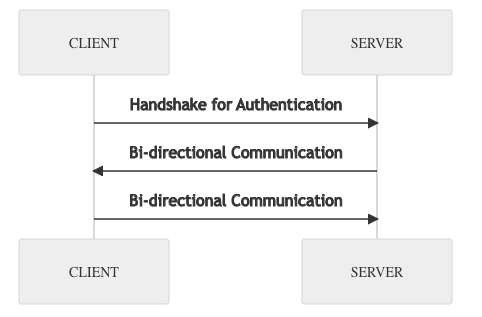
Websocket connections are quite simple in a top-level sense: You initiate a connection with a WebSocket server, and upon connection, you might be asked for verification for connection. This part initiates a handshake with the server. After that, you simply maintain the server connection and start sending/receiving live streaming data!
To maintain the server connection, it is often needed to perform a sort of "connection check" every once in a while. Typically this is done byPING PONG. You ping the server, and the server responds with a pong signifying the connection is still alive.
Example Usage
Each WebSocket server has its own protocol. We here at Terra created a very simple WebSocket server to stream data from a user's device to our developers.
Let's assume you are a developer using Terra. You wish to connect to our WebSocket server to see real-time data from your users.
There are a few things we must do:
- Initiate the connection
- Send a verification (we use tokens)
- Maintain a heartbeat (The ping/pong we use to keep the connection in check)
For this example, we will be using Javascript's ‘ws' library. However, implementation is similar for other languages!
Let us also assume you have generated the token. If you do not know how to please check out our blog on how to use a REST API!
First, let us maintain the connection and perform the handshake:
The code above initializes a function for keeping a WebSocket connection. On line 6 it initiates a connection to the WebSocket server.
The ‘ws' library allows us to implement EventListener's through the addEventListener function.
opentells the connection what should happen upon connection. Right now we simply printConnection Establishedcloseanderrorcurrently also only prints that the connection either closed or errored. On close, there's usually areasonwhy it closed, and on error, there usually is an error code telling you what was the cause.messageis the main part. You can do something on a message sent to you. Terra's websocket messages always come with anopfield signifying anOpcode.Opcode 2is "HELLO". Upon initialising a connection, this sends you a payload as such:{"op":2, "d":{"heartbeat_interval": 40000}}. This message essentially tells you to send aping(in this case a heart beat), every 40000 milliseconds. This is what theheartBeat()function does. ThesetInterval()function allows you to periodically call the function at a set interval.Opcode 1means "Heartbeat acknowledged". This means that the server knows you are still connected and would not close your connection. Finally,Opcode 3means "VERIFY". You send this payload to the server to verify your status.- Any other messages, are simply printed.
Next, we can run the function, and see what happens:
Connection Established
↓  {"op":2,"d":{"heartbeat_interval":40000}}
↑  {"op":0}
↑  {"op":3,"d":{"token":"dGVzdGluZ0VsbGlvdHQ.MU1fASa1nR9EpQWQx67xIN7veTFKFwudaB4HbN4kw9A","type":1}}
↓  {"op":1}
↓  {"op":4}
↑  {"op":0}
↓  {"op":1}
↓  {"op":5,"d":{"ts":"2022-06-01T14:47:08.055Z","val":86.0},"uid":"100b370c-d2be-42a2-b757-01fc85c41031","seq":12254,"t":"HEART_RATE"}
↓  {"op":5,"d":{"ts":"2022-06-01T14:47:08.701Z","val":87.0},"uid":"100b370c-d2be-42a2-b757-01fc85c41031","seq":12255,"t":"HEART_RATE"}
↓  {"op":5,"d":{"ts":"2022-06-01T14:47:09.698Z","val":86.0},"uid":"100b370c-d2be-42a2-b757-01fc85c41031","seq":12256,"t":"HEART_RATE"}
↓  {"op":5,"d":{"ts":"2022-06-01T14:47:11.041Z","val":86.0},"uid":"100b370c-d2be-42a2-b757-01fc85c41031","seq":12257,"t":"HEART_RATE"}
↓  {"op":5,"d":{"ts":"2022-06-01T14:47:12.049Z","val":86.0},"uid":"100b370c-d2be-42a2-b757-01fc85c41031","seq":12258,"t":"HEART_RATE"}
We can break the messages down:
- An initial
Hellofrom the server withOpcode 2followed by the script sending anOpcode 3with the verification payload. The server then sends back anOpcode 4meaning "READY". - The
'Opcode 0andOpcode 1to and from the server is simply the heart beating - Then there are many
Opcode 5messages that contain data for a user withuidand their "HEART_RATE" values.
Go wild
The messages in these WebSocket connections can be completely arbitrary. As said before, each WebSocket server has its own protocol and may not adhere to the same one. However, the idea is always the same: you initiate the connection, complete the handshake, and do something "on message, on open, and on close". These are usually implemented within an external library that you can use. Similar to the "ws" library from javascript, there's also "websockets" library on python, URLSessionWebSocketTask object in swift, and "okhttp3" on java to create WebSocket connections.
Keeping this same structure in mind, you should be able to connect to any WebSocket server as you wish (as long as you follow their structure). Other than the current example given, you can also send messages through WebSockets in a chat room, get live social media feeds, get real-time financial stock data, or even real-time sports updates!